Social media for law firms: a weekly plan that stays within the rules
People choose a lawyer the way they choose a doctor: by trust, often after reading something that lawyer wrote. Most firms still post only when they win an award. This is a weekly plan for a firm that wants clients to find it before they need it: which network for which kind of post, how to explain the law without giving advice, the rules every post has to keep, and how to have a partner approve each one before it goes out.

Rodolfo MotaFounder of SPREVA
The short version
Answer the questions clients ask, in plain words, from each lawyer's own LinkedIn profile, and share the best answers to the firm's Page. Keep Google Business Profile current for people searching for a lawyer nearby. Never post about a client without their written consent, never promise a result, and follow your bar's or law society's advertising rules. Turn on approval, so a partner reads every post before it goes out, and keep the record of who approved what.
Where clients look for a lawyer
Each network reaches clients at a different moment:
| Network | Who you reach | What to post |
|---|---|---|
| Companies, in-house counsel and the lawyers who refer work | Each lawyer's posts on their field, a PDF guide, what a new law changes | |
| Google Business Profile | People searching for a lawyer near them | Opening hours, areas of practice, a short answer to a common question |
| Local clients, families and small business owners | Answers in plain words, events, the team | |
| Instagram and TikTok | Younger clients who search on social apps | A 30-second answer to one question, filmed by the lawyer |
| YouTube | People reading up on a problem before they call | Longer explainers, and what happens at the first meeting |
A week of posts
Five posts a week, shared between the lawyers so nobody writes more than one or two:
- Monday: one question clients ask, answered in plain words on LinkedIn and Facebook, such as what to bring to the first meeting.
- Tuesday: the same answer as a 30-second video for Reels, TikTok and Shorts, filmed by the lawyer at their desk.
- Wednesday: one lawyer of the firm: their field, the kind of case they enjoy, how to reach them.
- Thursday: a new law, a court decision or a deadline, and what it means for your clients, in three short paragraphs.
- Friday: the firm itself: a talk someone gave, a community event, the office, on Google and Facebook.
What every post has to keep
Lawyers' advertising rules differ by country and by state, so check the ones that apply to you. Most agree on these:
- Nothing false or misleading. In the United States, most states base their rules on the American Bar Association's Model Rules, and Model Rule 7.1 covers every communication about a lawyer's services, posts included.
- No promise of results. A past case does not predict the next one. If you post a result, state it plainly, and check whether your rules ask for a line saying results vary.
- Careful with “specialist”. Many jurisdictions let a lawyer claim to be a certified specialist only when an approved body has certified them.
- No client without written consent. Confidentiality covers more than names: a case told in enough detail identifies the client. Ask in writing before any client story, review or photo goes out.
- No advice in comments. Answer a public question with general information and an invitation to book a call, and never confirm that someone is a client.
Explain the law, do not give advice
The posts that bring clients answer the questions you hear every week, written for someone who has never met a lawyer. Keep each to one question, say what usually happens and what depends on the details, and end with how to book a first call. Many firms add one line, such as “This is general information, not legal advice.”
Each lawyer's own profile
On LinkedIn, people read people. A post from a lawyer's own profile often reaches more readers than the same post from the firm's Page, and it brings referrals from people who know that lawyer. Connect the firm's Page and the profile of each lawyer who posts to the same workspace, choose several of them on one post, and give each its own words in its tab. How to schedule posts to a LinkedIn company Page.
A partner approves every post
- 1
Turn approval on. In Settings, General, turn on Posts need approval before they go out. From then on, posts are sent for review instead of scheduled.
- 2
Invite the partner as a Reviewer. A Reviewer only approves posts or sends them back with a note, sees nothing else, and does not take a seat.
- 3
Write, then send for review. Associates and staff write as Editors or Publishers, choose the time, and press Send for review.
- 4
Approve from a phone. The partner sees each post with its preview and its time, and presses Approve or Request changes. Editing an approved post sends it back for review.
- 5
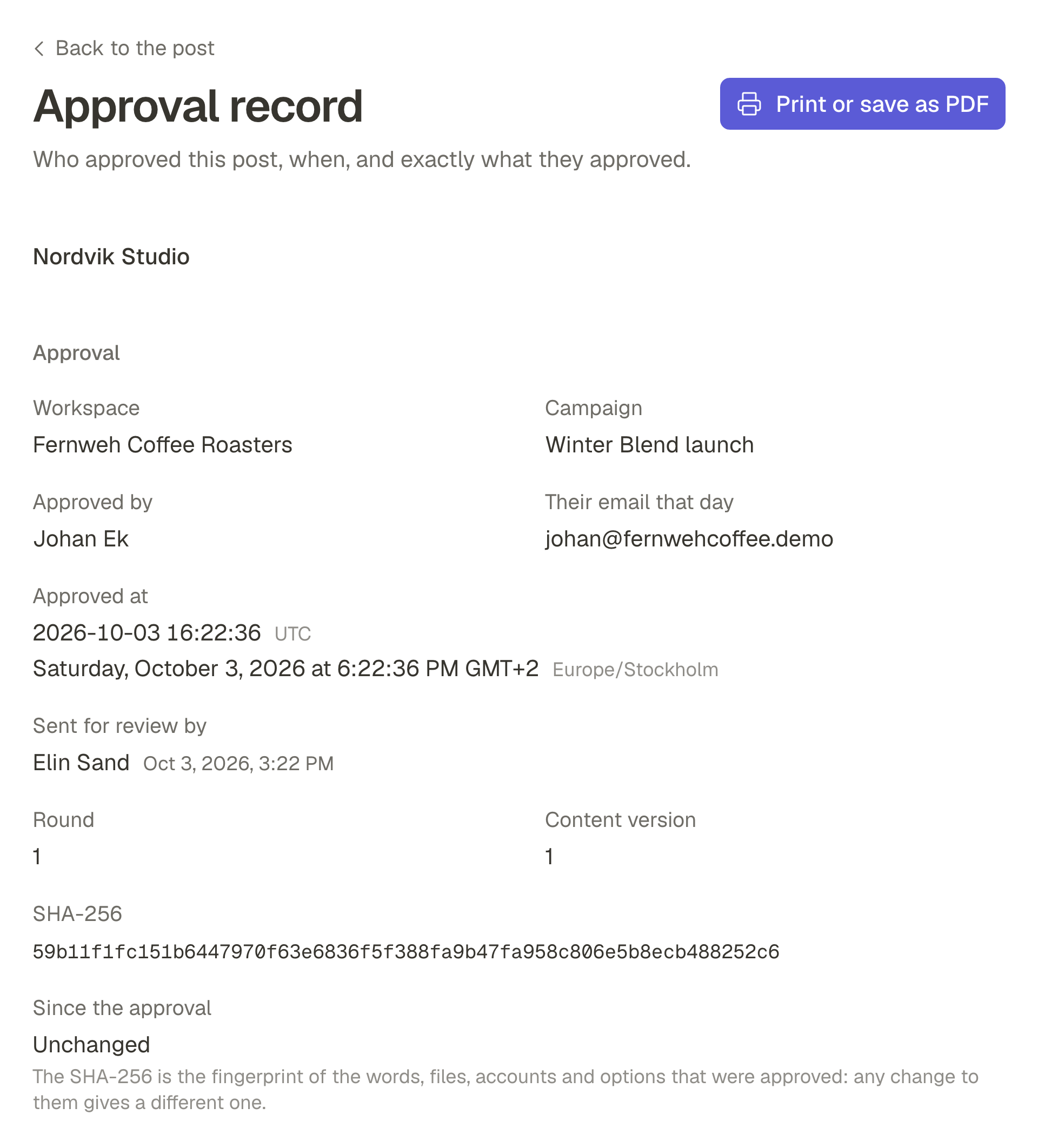
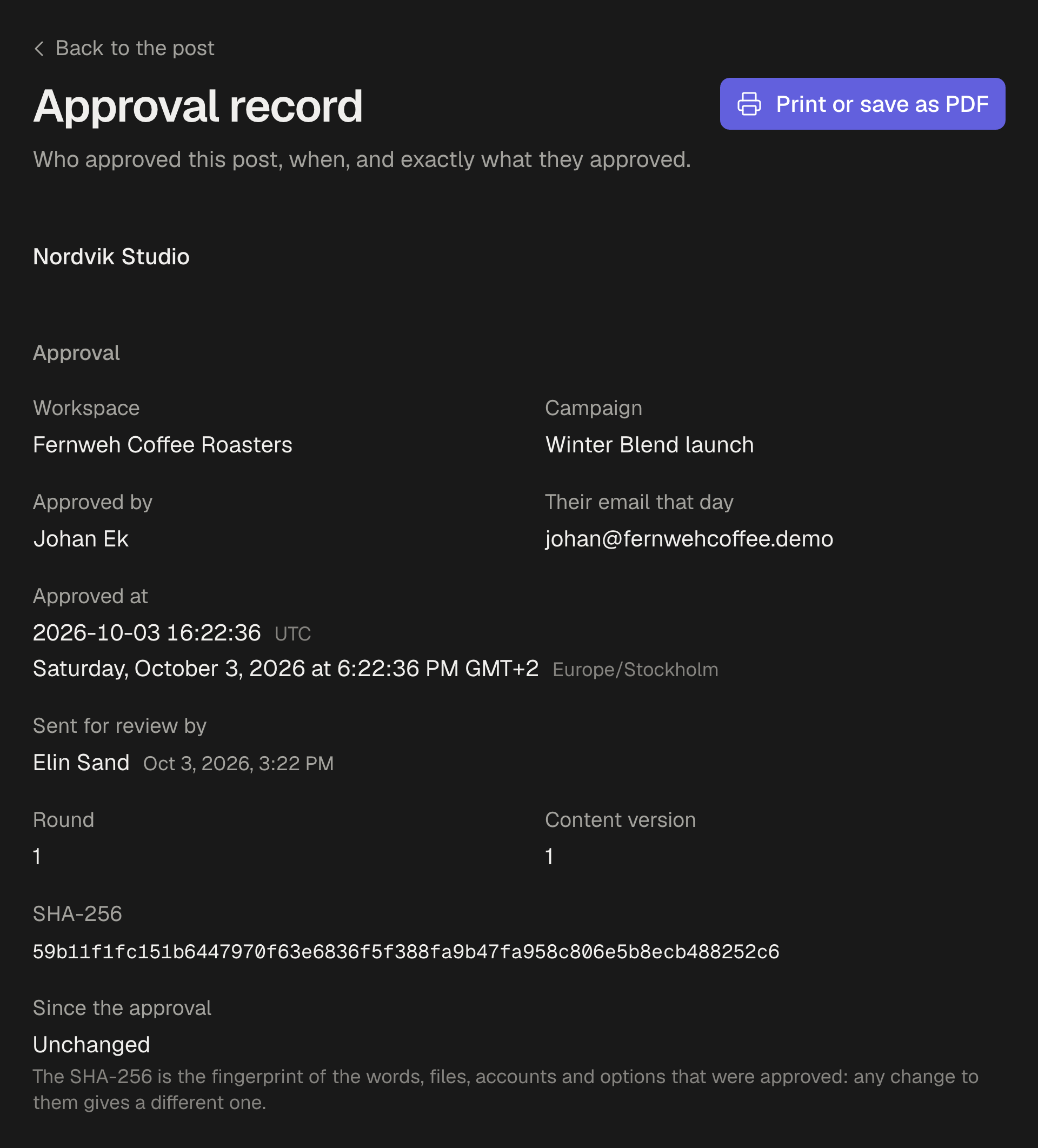
Keep the record. Each approved post keeps who approved it, when, and the exact text they saw, and Owners and Admins see every change in the Audit log.
Film the answer
A lawyer answering one question to the camera, in 30 seconds, is the video that works: the face a client will meet, in plain words. Film it upright by a window. On Pro and Business, Studio adds captions from what is said, and cuts a recorded talk or webinar into short clips. How to write a hook for Reels, TikToks and Shorts that makes people stay.
What stays in the apps
Messages, comments and reviews stay in each app. Move any conversation about someone's case to email or a call, where it belongs. SPREVA writes, schedules, publishes and reports the posts that bring people to you.
Start with five questions
Connect your firm's LinkedIn Page, Google Business Profile and Facebook, write down five questions clients asked this month, turn on approval, and schedule one answer a week from each lawyer. Every plan starts with a 7-day trial. One post from draft to feed: a client approval workflow, step by step.
Questions
How often should a law firm post?
Once or twice a week from each lawyer who posts on LinkedIn, and an update on Google whenever your hours or services change. Regular matters more than often: a queue keeps the rhythm in a busy week.
Do our posts need a disclaimer?
It depends on where you practise. Many firms add “This is general information, not legal advice” to posts that explain the law. Check your bar's or law society's rules for anything they require, such as on posts about results.
Can we post client reviews?
Only with the client's written consent, and only where your rules allow testimonials. Some jurisdictions limit them or ask for a line saying results vary.
Can a partner approve posts without seeing everything else?
Yes. Invite them as a Reviewer: they see only the posts waiting for them, approve each one or send it back with a note, and take no seat.
Written by
Rodolfo Mota
Founder of SPREVA
Makes SPREVA in Portugal: the Studio, the tools an agent works with, and the publishing behind them.
Keep reading
- How to schedule posts to a LinkedIn company PageSchedule posts to your LinkedIn company Page as the Page: text, images, a video or a PDF carousel, next to your own profile, with the Page's numbers back.
- “That is not what I approved”: what to show the clientA thumbs-up in a chat is weak proof when a client disputes a post. What an approval record should hold, how SPREVA keeps one, and how to use it calmly.
- How to schedule Google Business Profile posts, for one location or manySchedule Google Business Profile updates with a photo and a Learn more button, for one location or many: how it works in SPREVA, and what Google allows.
How do we answer a legal question in the comments?
With general information and an invitation to book a call or send an email. Never advise on someone's case in public, and never confirm that someone is a client.