Social media for dentists: a weekly plan that brings in new patients
People choose a dentist the way they choose anyone they have to trust: they look at the place, the faces and what other patients say, often on their phone, often the evening before they call. Social media is where a practice can answer that look before the first appointment. This is a weekly plan for it: what to post on which network, the rules that protect your patients, and how to schedule the whole week in about an hour.

Rodolfo MotaFounder of SPREVA
The short version
Show the people and the place, and answer the questions patients are afraid to ask. Keep Google Business Profile current for the people searching nearby, post the team and short answers on Instagram and Facebook, and put the same answers on TikTok and Shorts as clips. Never show a patient without their written consent, never discuss anyone's treatment in a comment, and let the dentist approve each post before it goes out. Write the week once and let a queue publish it.
Where patients choose
Each network meets patients at a different step:
| Network | Who you reach | What to post |
|---|---|---|
| Google Business Profile | People searching for a dentist near them | Opening hours, a new treatment, holiday closures, with a link to book |
| Local people who are deciding whom to trust | The team as a carousel, a question answered as a Reel, today at the practice as a Story | |
| Patients and their families, often parents | News, children's checkups, a reminder before the holidays | |
| TikTok and YouTube Shorts | People who have not heard of you yet | One question in under a minute: does whitening hurt, how often to change a toothbrush |
A week of posts
Five posts a week, a rhythm one person at the front desk can keep:
- Monday: the week at the practice on Google and Facebook: opening hours, a free slot, a new member of the team.
- Tuesday: one question patients ask, answered in under a minute, for Reels, TikTok and Shorts.
- Wednesday: one person of the team, as an Instagram carousel: who they are, what they do, why they chose it.
- Thursday: a tip for the week, such as flossing done right, or what to do when a tooth breaks on a weekend.
- Friday: the practice itself: the waiting room, the new equipment, the view from the chair, with the link to book.
What a practice never posts
Health care has rules that a café does not. Before anything goes out:
- No patient without written consent. No face, no smile, no X-ray and no name without a signed yes for that use, and remove the post the day they ask.
- No treatment talk in comments or reviews. Never confirm that someone is your patient, even to thank them. Answer with a general sentence and invite them to call.
- No promises of results. Many countries limit what health professionals may claim, and some restrict before-and-after photos and testimonials. Check your professional body's rules first.
- No diagnosis online. A comment asking whether a pain is serious gets one answer: book an appointment, or call now if it is urgent.
Schedule the week in an hour
- 1
Take a month of photos in one afternoon. The team, the rooms in daylight, the equipment, the street door, and a few upright clips of someone answering a question.
- 2
Let the team send their photos. In the media library, open a folder's menu and choose Request files…: anyone with the link can send photos and videos into that folder, without an account.
- 3
Write each post once. Then press Adapt to each network and check each version in its tab: the short one for TikTok, the practical one with the booking link for Google and Facebook.
- 4
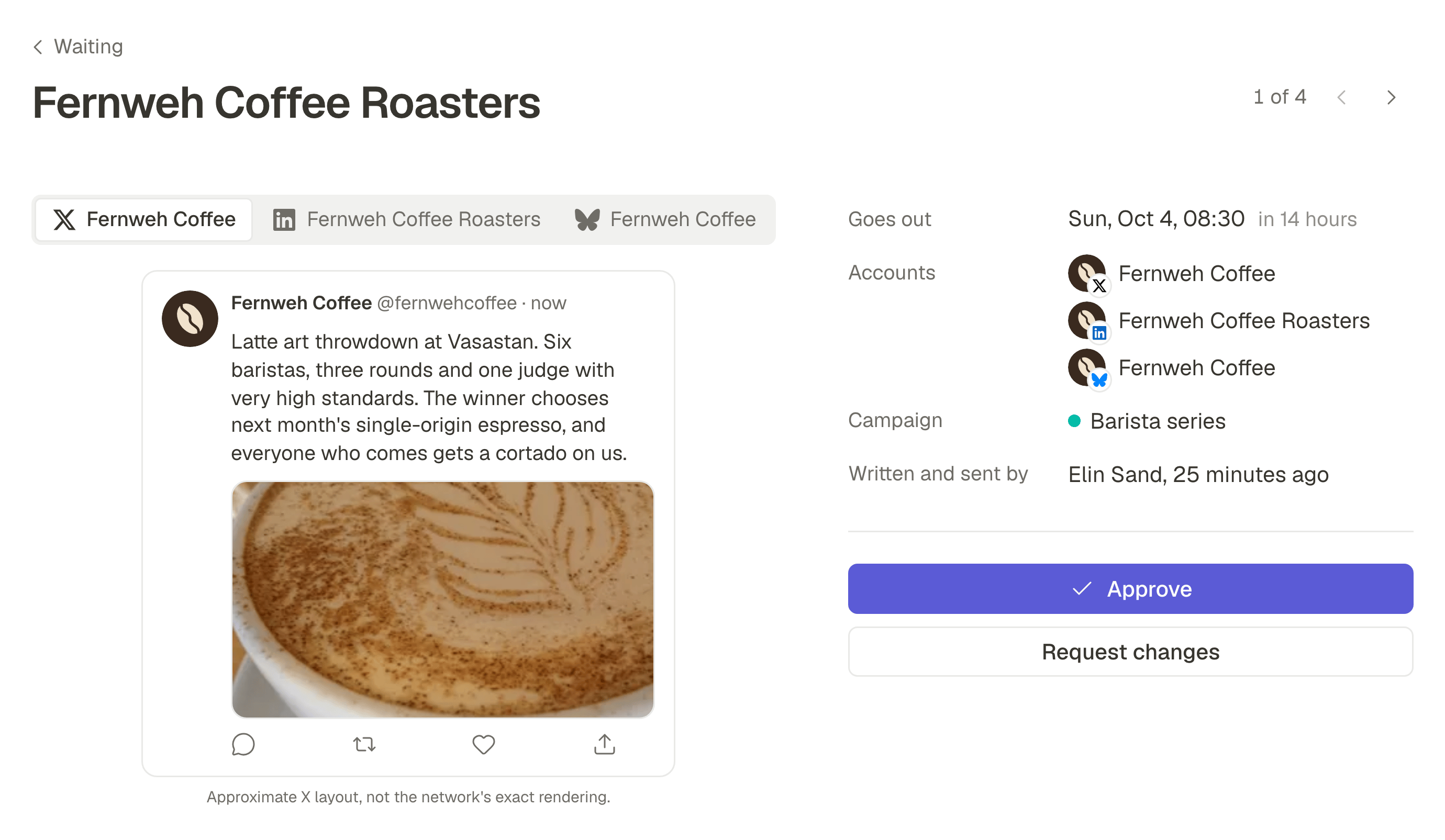
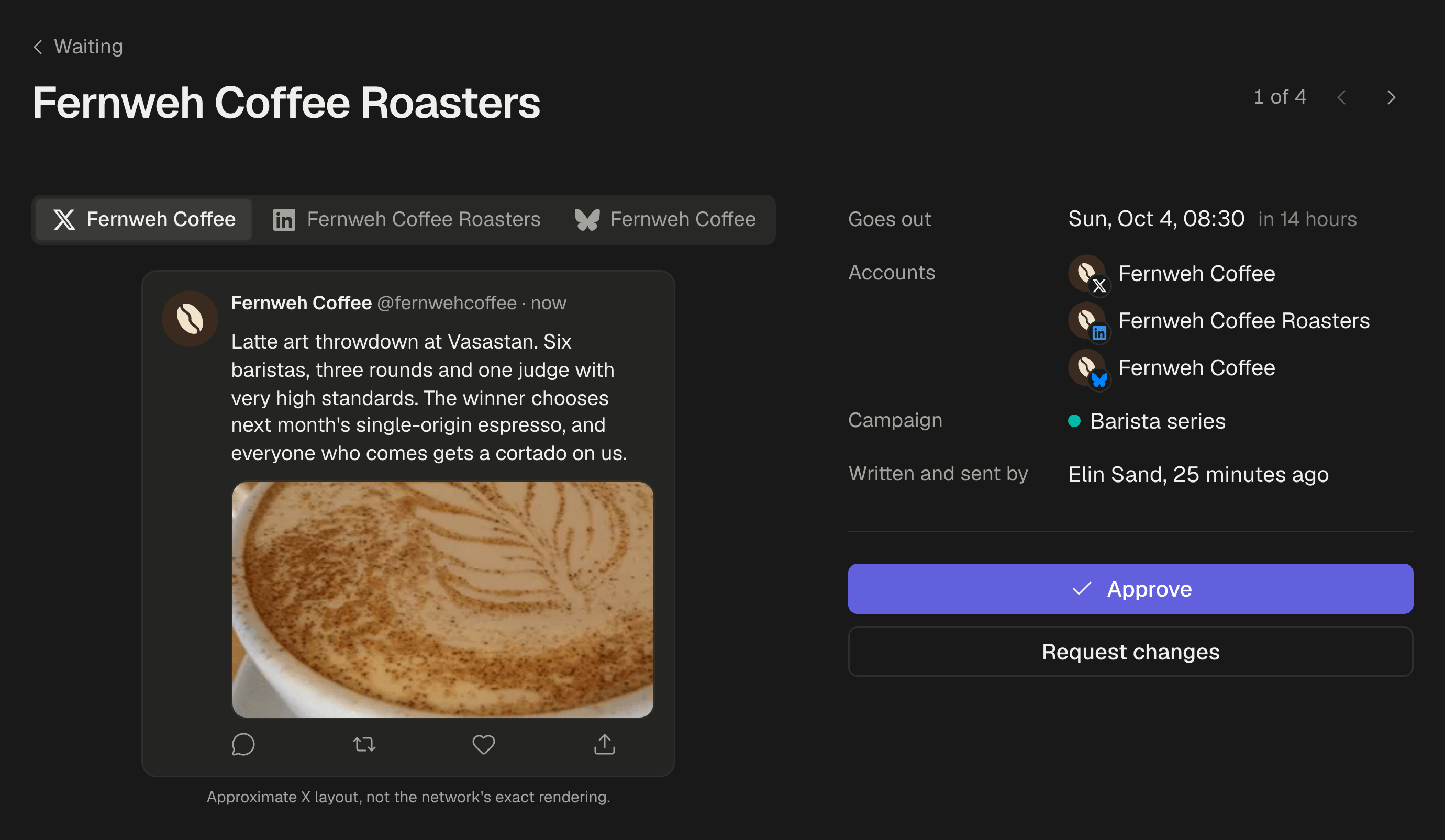
Let the dentist approve before anything goes out. In Settings, turn on Posts need approval before they go out, and invite the dentist as a Reviewer: they approve each post or send it back with a note, from their phone, between patients.
- 5
Add the week to a queue with your posting times, such as 07:30 before work and 19:00 when people plan their week. A post nobody approved by its time is not sent.
Answer the questions patients ask
The best posts for a practice are the questions you hear in the chair every day: does it hurt, how long does it take, is it worth it, what should a child's first visit be like. Keep a list at the front desk, and each week turn one into a clip and a short post. Someone who has watched you answer their question calmly is already less afraid to book. How to write a hook for Reels, TikToks and Shorts that makes people stay.
A campaign for each season
Make the year's moments into campaigns with their own colour: back-to-school checkups, the weeks before the holidays, the end of the year when insurance or yearly allowances run out where that applies to your patients. The posts of each stand out in the calendar, and Analytics filtered by that campaign shows which ones were seen and got clicks. How to plan and track a social media campaign, from the first post to the results.
What stays in the apps
SPREVA makes, schedules, publishes and reports. Reviews, messages and appointments stay in each app and in your booking system. Answer reviews every week, the good ones too, without a word about anyone's treatment: people who are choosing a dentist read the replies as closely as the reviews.
Plan next week this afternoon
Connect your Google Business Profile, Instagram and Facebook, write down five questions patients asked this week, and schedule one a day with a queue. Every plan starts with a 7-day trial. SPREVA for small businesses.
Questions
How often should a dental practice post?
Three to five times a week on Instagram and Facebook, and an update on Google whenever something changes. A queue keeps that going in the weeks when nobody has time.
Does the dentist have to be on camera?
No, though it helps: patients want to see who will treat them. A hygienist, the receptionist or a photo of the team works too.
Can I post a patient's new smile?
Only with their written consent for that use, and within your professional body's rules on before-and-after photos. When in doubt, show the work without the person.
Can SPREVA reply to reviews?
No. Replies to reviews and messages stay in each network's app.
An agency runs our accounts. How do we keep control?
Turn on approval and invite the dentist as a Reviewer. Reviewers take no seat, approve each post or send it back, and see nothing else of the workspace. One post from draft to feed: a client approval workflow, step by step.
Written by
Rodolfo Mota
Founder of SPREVA
Makes SPREVA in Portugal: the Studio, the tools an agent works with, and the publishing behind them.
Keep reading
- How to schedule Google Business Profile posts, for one location or manySchedule Google Business Profile updates with a photo and a Learn more button, for one location or many: how it works in SPREVA, and what Google allows.
- A social media routine for a small business, in one hour a weekA weekly routine for a café, a salon or a shop: one hour to schedule a week of posts to Instagram, Facebook, Google and TikTok, and a look at what worked.
- One post from draft to feed: a client approval workflow, step by stepOne bakery post followed from the draft to the morning it goes out: who does what, what the client sees, and what happens when the answer is not yes.